Your CONTPAQi® companies, backed up on their own, encrypted and ready to come back
A lightweight agent on your Windows® server backs up each company in CONTPAQi®'s own format, encrypts it and uploads it to the cloud on the schedule you choose. You watch and restore it from your browser.
- Per-customer encryption
- Verified backups
- Restores with a dry run
- No SDK, no open ports
Complete, automatic and secure backups
-
Complete backups, in CONTPAQi® format
Each backup is the whole company: database, ADD (digital documents) in the same format CONTPAQi® uses, and the report and company folders. Comercial, Contabilidad-Bancos and Nóminas in a single installation.
-
Automatic and unattended
Scheduled tasks for a batch of companies, “every 6 hours” or “daily at 11 pm”, with nothing technical to set up. Plus an immediate backup with one click when you need it.
-
Encrypted and off-site
Each account has its own repository, encrypted with its own key. With deduplication and compression, daily backups only upload what changed.
-
Restore without fear
A restore dry run shows the plan without touching anything. When you apply it, it keeps a copy of what it replaces and brings CONTPAQi® back into service.
What's included
-
Clean backups
Stops CONTPAQi®'s licences and services, waits until no users are connected, backs up and brings everything back.
-
Integrity checks
Each backup is validated when it is created and the package carries a manifest and SHA-256 checksums. Storage is checked daily.
-
Automatic company detection
The agent reads the CONTPAQi® catalogues and shows your companies so you can pick which ones to back up.
-
Dashboard per company
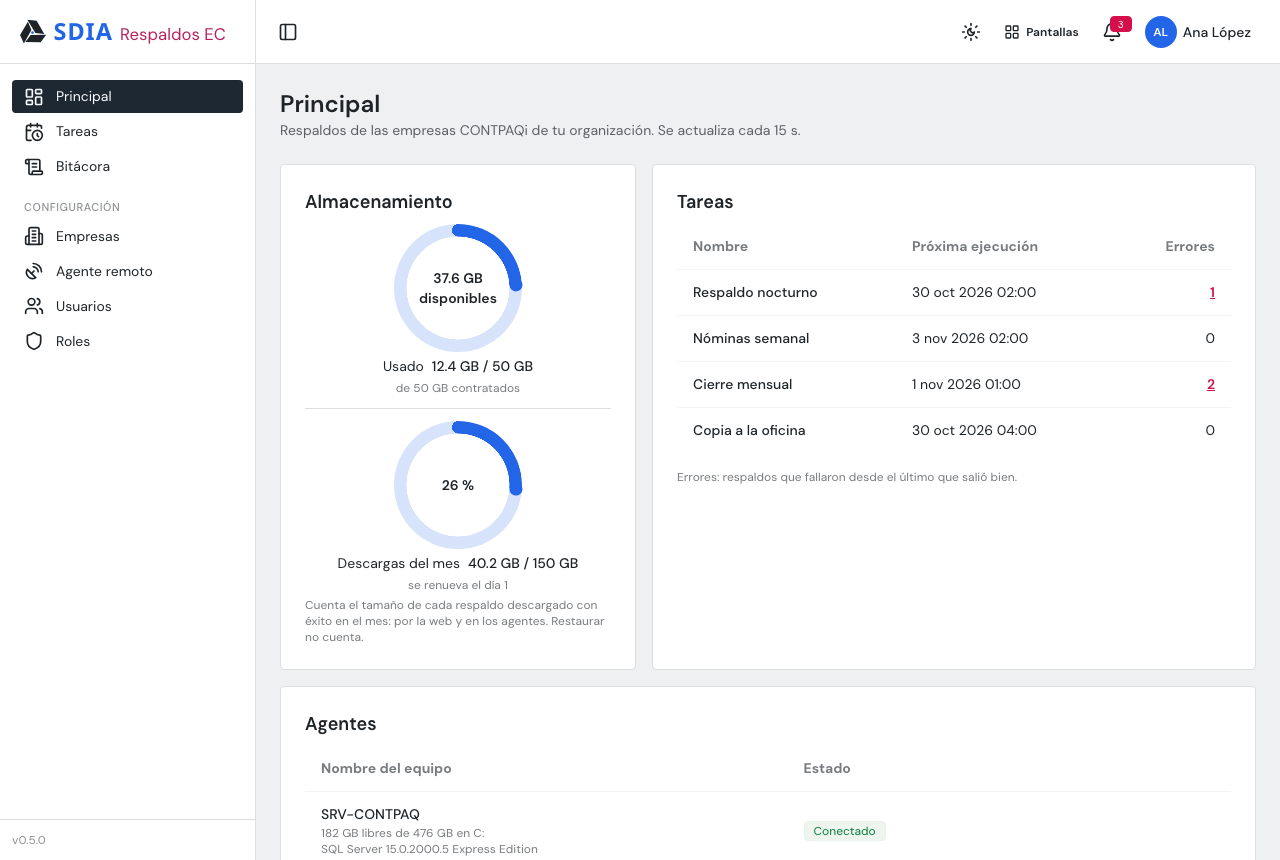
Latest backups, size, CONTPAQi® version, failed tasks, disk space on the machine and usage of your contracted storage.
-
Alerts that clear themselves
Failed backup, low disk space, outdated agent or CONTPAQi® out of service. The alert goes away once the problem is fixed.
-
Pending uploads
If the internet goes down, the package waits and uploads on its own when the connection is back.
-
Downloads
From the web (up to 1.5 GB) or straight to the machine. A download agent keeps copies on another computer, on a schedule too.
-
Switch machines in minutes
The new machine inherits companies, tasks, history and credentials. Your backups are still there.
-
Remote agent updates
It updates from the web and rolls back to the previous version on its own if something fails.
How it works
-
Install the agent
Run the Windows® installer on the CONTPAQi® server and enrol it with a one-time token.
-
Approve the machine
Approve it in the panel and enter the SQL credentials: they are stored on the SDIA server, not on the machine.
-
Schedule your tasks
Choose the companies, the schedule and whether the backup is a clean one.
-
Sleep easy
The agent backs up, verifies, encrypts and uploads. You see the status, get alerts and restore whenever you need to.
Security at every step
Your backups travel and are stored encrypted, and only your organisation can see them.
- End-to-end encryption per customer: the repository password is generated by the server and is never shown or stored on the machine.
- The agent opens no ports: it starts a secure outbound connection, identifies itself with its own keys on every reconnection, and each machine is approved by hand.
- Each organisation sees only its own data, isolated from every other company.
- Roles and permissions (Administrator, Operator and Read-only) and single sign-on with your SDIA account.
- A hardened platform: vulnerability scanning on every release and a daily backup of the platform itself.
- On the server, local folders are accessible to administrators only.
Who it is for
-
Accounting firms
Many companies on one server: one batch, one schedule and one dashboard to see them all.
-
Small and medium businesses
A single server with off-site backups, without relying on a USB drive.
-
CONTPAQi® distributors and integrators
Separate accounts per customer, with alerts and remote updates without visiting the customer.
A plan sized to your operation
The subscription is per organisation and is built from what you need.
-
Contracted storage
The GB your backups take up. Each task's retention sets how many days they are kept.
-
Backup agents
One for each CONTPAQi® server you want to back up.
-
Download agents
An add-on to keep copies on another computer. Each month you can download up to 3 times your storage; restoring is never blocked.
Frequently asked questions
Do I need the CONTPAQi® SDK?
No. The agent reads the CONTPAQi® catalogues and works directly with SQL Server®.
What happens if the internet goes down?
The backup stays pending on the machine and uploads on its own when the connection is back.
Do my users have to leave CONTPAQi®?
Only for a clean backup. A normal backup does not interrupt them.
Can I restore on another server?
Yes. Switch machines and restore there, or download the package.
Who can see my data?
Nobody else. The repository is encrypted with one key per account.
Which systems and versions does it back up?
Comercial, Contabilidad-Bancos and Nóminas on SQL Server®. Each backup records the CONTPAQi® version and warns you if you restore with a different one.